
Best 5 Laptops for Architects
As an architect, you already know how important a good laptop is. Your whole design process depends on it. When you work on 3D model plans and render work, you cannot afford slow performance or sudden lag, right? A strong laptop helps you stay focused, and it keeps your ideas flowing without breaking your pace.
Honestly, Architects need a device that can open big project files, run heavy software, and switch between tasks smoothly. A bright, detailed display also makes a huge difference because every small line and shape matters in the final design. Good battery life and easy portability help during site visits and client meetings.
This blog for the Best Laptops for Architects highlights the laptops that can truly handle real design work. If you want something fast, reliable, and ready for serious projects – these are the options that make your job easier.
ASUS ROG Flow X16 GV601RM
| Pros | Cons |
| Bright Mini LED touchscreen display | Gets a little warm during heavy use |
| Strong performance for heavy tasks | |
| Fast SSD for quick loading |
First, we have the ASUS ROG Flow X16. This laptop is a real powerhouse that fits the daily demands of architects. The AMD Ryzen 9 processor and RTX 3060 graphics give smooth power to the laptop for 3D modeling, rendering and running heavy architecture software without slowing down your idea. Its big 16-inch WQXGA mini LED touch display is one of its best features because it shows every line detail and shadow with sharp accuracy, which helps a lot when you review plans or shape new design ideas.
The touch screen laptop with stylus support makes sketching concepts and marking corrections very simple so you can work naturally wherever you are. You also get dual USB Type C ports with DisplayPort support, which is great when you need extra monitors for a wider workspace. The strong 90Wh battery handles long sessions easily and the lightweight build makes it perfect for studio work, site visits and client meetings.

ASUS ROG Flow X16 GV601RM (AMD Ryzen 9-6900HS)
- Display – 16″ WQXGA (2560×1600) | IPS | Touch | 165Hz
- Processor (CPU) – AMD Ryzen 9-6900HS | 16MB Cache
- Graphics (GPU) – NVIDIA GeForce RTX 3060 Laptop GPU
- RAM (Memory) – 16GB (8×2) DDR5
- Storage (ROM) – 1TB NVMe SSD
- Battery – 90 Whrs
- Weight – Approx. 2.10 kg
Macbook Air M4 15” 16GB/512GB
| Pros | Cons |
| Lightweight design for easy carrying | Limited ports for accessories |
| Long battery life | |
| Clear camera for online meetings |
Up next, we have the MacBook Air M4 15-inch, and this one focuses on smooth everyday performance with a clean and lightweight design. The M4 chip gives strong and steady performance, and its10-core GPU handles drafting and model reviews smoothly. Besides, it moves through architecture tasks quietly and efficiently, which makes it great for long studio hours.
The 15.3-inch LED IPS display offers bright colors and a very consistent look so your design elements stay accurate on every project. The 16GB unified memory keeps multitasking stable, and the fast 512GB NVMe SSD loads large files without delay. Since the laptop weighs only 1.51 kg, it feels comfortable to carry from the classroom to the studio.
You also get Wi Fi 6E and solid speakers with a sharp 12MP camera that helps a lot in online client discussions. For architects who want performance in a calm and portable package, this MacBook Air is a reliable companion.

Apple MacBook Air M4 (15-inch | 16GB / 512GB)
- Display – 15.3″ IPS LED | 2880×1864 | 500 nits
- Processor (CPU) – Apple M4 (10-core CPU)
- Graphics (GPU) – 10-core Apple GPU
- RAM (Memory) – 16GB Unified Memory
- Storage (ROM) – 512GB NVMe SSD
- Battery – 66.5 Wh
- Weight – 1.51 kg
Lenovo Legion Pro 5 16ARX8
| Pros | Cons |
| Sharp WQXGA display with smooth 165Hz motion | Slightly heavy for daily carrying |
| RTX 4050 handles complex 3D models easily | |
| Strong performance for heavy architecture workloads |
At number 3, we have the Lenovo’s Legion Pro 5 16ARX8 and this one is made for architects who deal with tough workloads every day. It runs on the AMD Ryzen 5 7645HX processor which gives quick response when you open big project files or switch between your modeling tools. The RTX 4050 laptop GPU with 6GB VRAM supports heavy visuals, so checking forms, lighting or structure feels smooth and steady.
The 16-inch WQXGA screen gives a wide and clear working space that helps when you review large layouts or adjust details in your design. The fast 165Hz refresh rate keeps every movement sharp, which is useful for model rotations and animation previews. You get 16GB DDR5 RAM and a fast 512GB Gen4 SSD, so loading times stay low even with busy files.
With its 80Wh battery, strong cooling system and sturdy body, this laptop handles long hours of serious architecture work with confidence.

Lenovo Legion Pro 5 16ARX8 (AMD Ryzen 5 7645HX)
- Display – 16″ WQXGA (2560×1600) | IPS | 165Hz
- Processor (CPU) – AMD Ryzen 5 7645HX
- Graphics (GPU) – NVIDIA GeForce RTX 4050 Laptop GPU
- RAM (Memory) – 16GB DDR5 (SODIMM)
- Storage (ROM) – 512GB SSD
- Battery – 80 Wh
- Weight – Less than 2.5 kg
Microsoft Surface Studio Core i7-11370H
| Pros | Cons |
| Flexible design for sketching work | Battery goes a little down on heavy use |
| Strong performance for creative tasks | |
| Smooth 120Hz screen for modeling |
At number 4, we have the Studio i7 11th Gen model of Microsoft Surface Laptop. This model runs on a Core i7-11370H processor and RTX 3050 Ti graphics, yet its real strength is how easily it shifts between different tasks. Its 2-in-1 / convertible laptop design lets the 14.4-inch PixelSense Flow display to move from a normal laptop position into a low touch friendly angle that feels natural for sketching, tracing lines or making quick design notes. Its 120Hz refresh rate keeps drawings and model rotations smooth.
The 16GB RAM works together with the 512GB SSD to keep your files ready the moment you need them so your workflow stays steady and distraction free. A hi-res camera, clear mics and a strong sound system puts it among the best laptops for video conferences, making online meetings feel simple and natural. With a comfortable build and long battery support, this laptop fits well into an architect’s routine whether you are designing, presenting or planning your next concept.

Microsoft Surface Laptop Studio (Core i7-11370H)
- Display – 14.4″ PixelSense Flow | 2400×1600 | 120Hz
- Processor (CPU) – Intel Core i7-11370H (11th Gen)
- Graphics (GPU) – NVIDIA GeForce RTX 3050 Ti Laptop GPU
- RAM (Memory) – 16GB LPDDR4X
- Storage (ROM) – 512GB SSD
- Battery – 58 Wh
- Weight – 1.75 kg
Lenovo LOQ 15IRX9 13th Gen Intel Core i7-13650HX
| Pros | Cons |
| Clear FHD display for project work | Screen brightness could be higher |
| RTX 4050 handles smooth 3D modeling | |
| Fast 24GB RAM keeps workflow steady |
Lastly, we have the Lenovo LOQ 15IRX9, and this laptop is made for architects who want simple strength without any extra noise. The RTX 4050 graphics help a lot when you view complex shapes or adjust 3D layers because everything moves smoothly on screen. It runs on the Intel Core i7-13650HX which means you get fast reactions when handling bigger project files.
You get a bright 15.6-inch FHD display that gives a clean view that feels comfortable for long design sessions. The 24GB DDR5 RAM keeps your tools running steady and the 512GB NVMe SSD lets you open work files quickly so you do not lose time waiting. Its 60Wh battery offers enough backup for normal architecture tasks.
You also get Wi Fi 6 for stronger connections plus a sturdy build and an RGB keyboard that feels good to use.
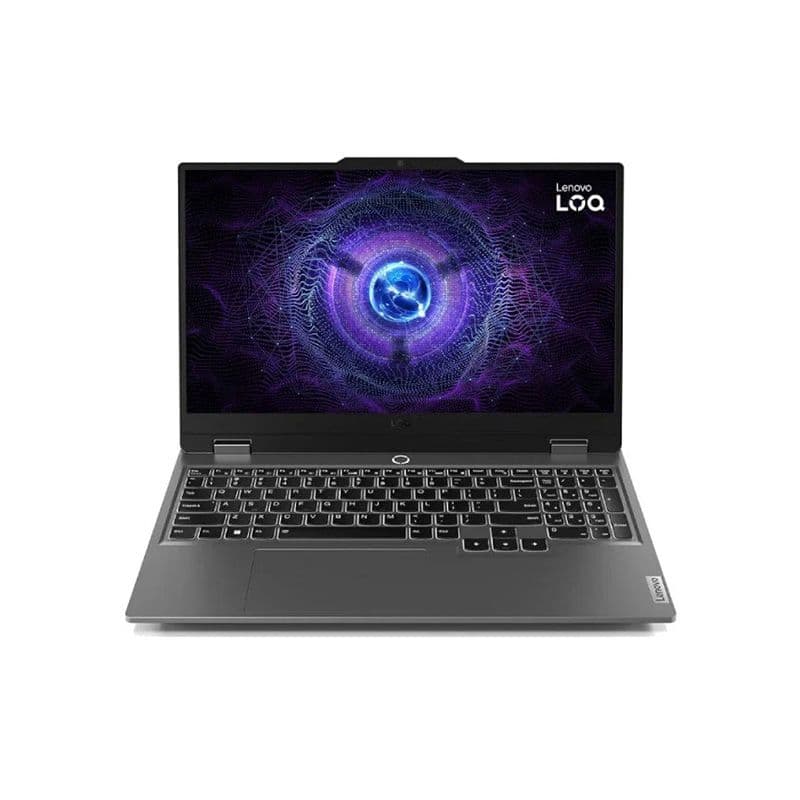
Lenovo LOQ 15IRX9 (Intel Core i7-13650HX)
- Display – 15.6″ FHD (1920×1080)
- Processor (CPU) – Intel Core i7-13650HX
- Graphics (GPU) – NVIDIA GeForce RTX 4050
- RAM (Memory) – 24GB
- Storage (ROM) – 512GB SSD
- Battery – 60 Wh
- Weight – 2.38 kg
What to Look for Before Buying a Laptop for Architects?
Choosing a laptop as an architect is not something you rush. Here are the key things you should always check before buying:
Powerful Processor
A strong processor keeps your design software running smoothly during heavy 3D modeling and drafting tasks, which helps you finish complex projects without frustration.
Dedicated Graphics Power
Reliable GPU handles detailed models and fast rendering, which gives you a smooth experience while working on high-quality architectural visuals and complex structures.
High Resolution Display
A sharp high resolution display helps you view every design element clearly to improve accuracy during layout planning, sketching, and visual presentations.
Large RAM Capacity
High RAM capacity lets you move between heavy apps without lag which maintains a fluid workflow during intense design sessions and multitasking needs.
Fast SSD Storage
Fast SSD storage opens large architectural files quickly to save time during deadlines and keeps your entire working experience faster and more responsive.
Strong Build Quality
A durable lightweight body supports constant travel between studio, home, and site visits which helps you work confidently in different environments every day.
Long Battery Backup
Strong battery backup lets you work during long meetings, site visits and travel hours to keep your productivity steady even when chargers are not available.
Conclusion
To wrap up this blog, I hope you have seen how each of these five laptops brings something valuable to an architect’s workflow. ASUS ROG Flow X16 stands out with strong power for 3D work and a bright touch display that helps during detailed planning. MacBook Air M4 15-inch gives smooth performance in a light body that feels great for everyday carry. Meanwhile, Lenovo Legion Pro 5 delivers tough strength for heavy modeling and long project sessions. On the other hand, Surface Laptop Studio adds flexible design and a smooth screen that makes sketching feel natural. And lastly, Lenovo LOQ 15IRX9 gives steady performance for architects who want simple speed for daily tasks.
Each of these laptops can support real design work and keep your ideas moving without slowing you down. If you want the right laptop at a fair price, you can always explore Vertech, where finding the right device feels simple and stress-free.
FAQ
What kind of laptop do architects really need?
Architects need a laptop with strong processing power and smooth graphics performance so 3D models and render work run without lag.
Is a dedicated graphics card important for architecture software?
Yes, a dedicated graphics card helps you handle big project files, complex 3D modeling, and rendering.
Do architects need a high-refresh-rate display?
Yes, a high-refresh-rate display is helpful because it makes design movement feel smoother during modeling work.